Using the New CityU Intranet
To provide easier and faster navigation, a new Intranet Home Page was launched in late September 2000. To give you an idea on what’s new, below is a summary of the enhancement that you should not miss.
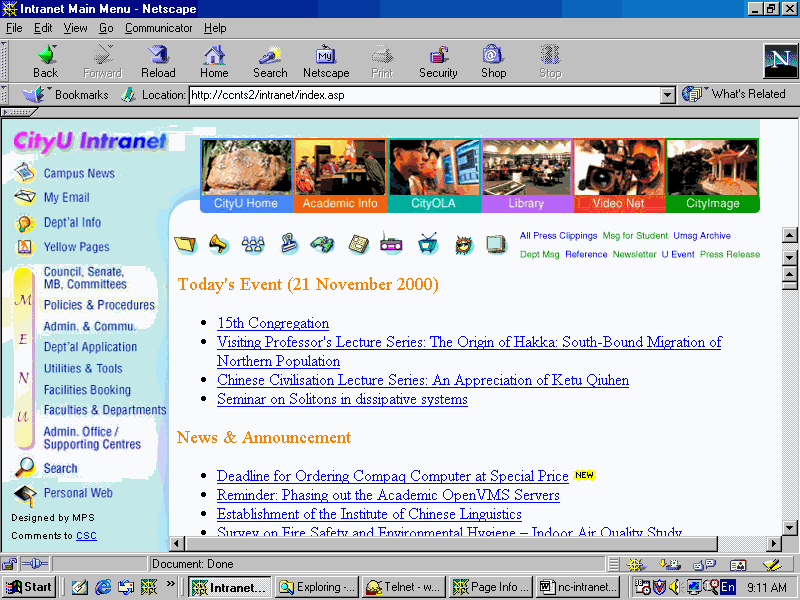
New Options
-
My Email

Instead of clicking through the “Admin. & Commu.”menu, then “Email - EudoraPro Submenu” and finally your username, you can now just click on this option once for a quick and direct access to your Eudora mailboxes.
-
Facilities Booking
By using this option, you can reserve the bookings on the lecture theatres, classrooms, CSC teaching studios and sports facilities on-line in advance. -
WebCam

This is a live view of the Student Hostel construction site at Cornwall Street.
University Messages, Navigation Buttons and Menus All in One Window
University Messages are now displayed on the Intranet Home Page so that messages like “Today’s Event” can always be seen whenever this page is visited. If you prefer to display the messages in a separate full size window, you may click

Best Viewed in 800x600
While the old Intranet is best viewed by the display resolution of 640x480 pixels, it is 800x600 for the new one. Otherwise you may find that some options are missing or there are lots of scroll bars. To change the display resolution of your PC to 800x600, please follow the steps below:
1. Click Windows “Start” button on the bottom left corner.
2. Select “Settings”.
3. Click “Control Panel”.
4. Double click the “Display” icon.
5. Click the “Settings” tab in the pop up “Display Properties” window.
6. For “Screen Area”, drag the setting to “800 by 600 pixels”.
7. Click the “OK” button.
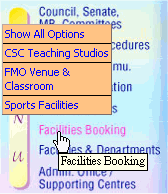
Instant Sub-menu
When pointing to any of the four menus below, a pop up sub-menu appears:
|
|
Each pop up sub-menu shows the most frequently used options. You may point and click an option on this pop up sub-menu to invoke it directly.
Just like before, you may access the Intranet when you are off-campus with any PC connected to the Internet. On CityU Home Page (http://www.jvrhmfr.xyz), click “Intranet” and then select “Staff”. Enter your Intranet username and password when prompted. Unfortunately, only a limited set of options can be provided. If you forget your Intranet password, please ring our CSC Help Desk colleagues at ext.7658 to have it re-set.
Your suggestions and comments are most welcome. Please send them to cc@plink.cityu.edu.hk.