Handy Software Added on CSC Student LAN
This summer, a collection of useful software has been added to the CSC student LAN which is accessible in the CSC Student Terminal Area. Some are simply software upgrades while others may be new to staff and students. The followings are brief descriptions of the newly installed software which may become handy to some of you:
1. Kingsoft PowerWord

Kingsoft's PowerWord is a powerful Chinese and English language study tool that supports on-screen word extracting by mouse and convenient wildcard matching of a word, being very popular with students of Chinese language, engineers and scientists in various fields.
PowerWord 2002 supports all Windows editors, Internet Explorer, Netscape, and Adobe Acrobat PDF formats. It does not need add-on Chinese software as platform. English-Chinese, Chinese-English and Chinese-Chinese dictionaries are provided.
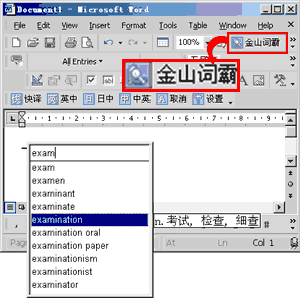
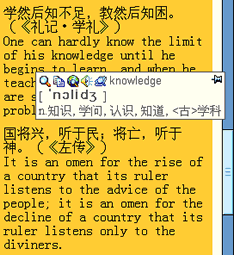
Users may use this dictionary as an aid to read and write documents on-line. Whenever there is any unfamiliar or "foreign" vocabulary, either in English, or Chinese, you just highlight or point to the word using your mouse, and you will see PowerWord's instant translations and pronunciation. There is also an input field for search purposes. The input type can be in English, simplified or traditional Chinese. If you load it as start up, you can look up the meanings of any unfamiliar vocabulary.

|
|
2. Chinese Font Pack

Background
The CityU's standard Chinese font,

-
The font design is based on Big5 which is not the standard support (i.e. Unicode) in MS WinXP.
-
The cost is high when we consider deploying the font set to the whole university.
- The font we use does not include the HKSCS additional characters (i.e. the latest standard of user-defined character set in the market).
-
A search is thus conducted and subsequent study showed that the "Founder" Kai Chinese font is the most suitable one for the font support.
The "Founder" Chinese Font Set
The "Founder" or "

The font set is now available for installation on the Software Tools & Utilities menu accessible from the e-Portal login page. Simply select the option and the setup program will install the selected font or fonts into the standard system font directory (e.g. c:\windows\fonts). As the "Founder" Chinese fonts just provide fonts, so users can use "Founder" Chinese fonts as Windows fonts. Users can at any time delete the fonts from Control Panel -> Fonts.
3. TextPad 4.4
TextPad is more than just a text editor. It is designed to provide the power and functionality to satisfy the most demanding text editing requirements. The 32-bit edition can edit files up to the limits of virtual memory, and it will work with Windows 9x, ME, NT 4, 2000 and XP.
TextPad has been implemented according to the Windows XP user interface guidelines, so great attention has been paid to making it easy for both beginners and experienced users. In-context help is available for all commands, and in-context menus pop-up with the right mouse button. The Windows multiple document interface allows multiple files to be edited simultaneously, with up to 2 views on each file. Text can be dragged and dropped between files.
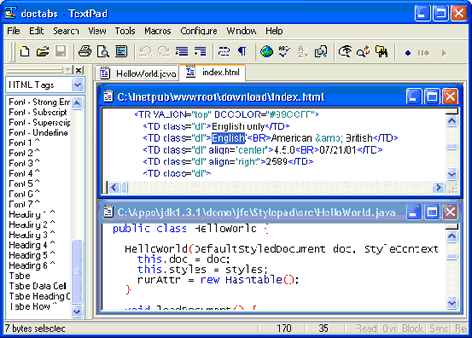
In addition to the usual cut and paste capabilities, you can correct the most common typing errors with commands to change case, and transpose words, characters and lines. Other commands let you indent blocks of text, split or join lines, and insert whole files. Any change can be undone or redone, right back to the first one made. Visible bookmarks can be put on lines, and edit commands can be applied to lines with bookmarks. Frequently used combinations of commands can be saved as keystroke macros, and the spelling checker has dictionaries for 10 languages.
It also has a customizable tools menu, and integral file compare and search commands, with hypertext jumps from the matched text to the corresponding line in the source file (ideal for integrating compilers).
4. EndNote 6
EndNote is...
-
a database for storing and managing all your references
-
a tool for creating bibliographies in documents
-
an online search tool
Millions of researchers, scholarly writers, students, and librarians use EndNote to search online bibliographic databases, organize their references, and create bibliographies instantly and automatically. Instead of spending hours typing bibliographies, or using index cards to organize their references, they do it the easy way - by using EndNote!
EndNote is a valuable all-in-one tool that integrates the following tasks into one program:
-
Search bibliographic databases on the Internet
-
Organize references in a database
-
Use Microsoft Word templates to create your manuscript
-
Watch bibliographies appear as you write
Word processor compatibility:
EndNote 6 is compatible with the following word processing and text formats:
-
Cite While You Write feature: Microsoft Word 97, 2000, XP
-
Add-in feature: Corel WordPerfect 2000, 2002