What’s New in Internet Explorer 9?
Microsoft launched its latest web browser Internet Explorer 9 (IE9) in mid-March 2011. In comparison with IE8 and IE7, IE9 is clearly faster, cleaner and safer than its predecessors. In addition, Microsoft has derived a table to show that IE9 outperforms some rival browsers in terms of performance, ease of use, security, reliability, privacy, web standards supported and compatibility, and developer tools supported (see References below).
IE9 has many new features such as Pinned Sites, Notification Bar, Search in the Address Bar to enrich your web browsing experience. It has also been tweaked for security, new anti-malware protection, and better ways to protect your privacy. We will have a glimpse of IE9’s new features and other changes below.
IE9 New User Interface
The interface of IE9 is simplified and clean. Less screen area is taken up by the browser, letting people browse and experience more of what websites have to offer. IE9 puts all the tools on one line. It combines the most important navigation buttons, unified search and address bar, tabs and options buttons (Tools button , and Favorites button ) all on the same line. This is particularly useful for mobile users who usually work with small screen sizes.

IE9 Important Changes
- HTML5 Support
IE9 offers developers the ability to create web experiences with HTML5 that helps the web development community to create rich, interoperable, standards-compliant web applications. It facilitates you to play video and sound without the need of another plugin or software (like Adobe Flash player), and provides the same performance and immersive experience that they have come to expect from a native application. - Hardware Acceleration
IE9 uses the DirectX family of Windows application programming interfaces (APIs) to enable several advances for web developers. All graphics and text rendering has been moved from the CPU to the graphics card by using Direct2D and DirectWrite. Graphics hardware acceleration makes the rich, intensive graphics render faster on Windows while using less CPU power.
IE9 New Features
- Pinned Sites lets you pin websites directly to the Taskbar so that you can launch your favorite websites in a single click. To pin a website to the taskbar, click the webpage’s tab and drag it to the Taskbar.
- Notification Bar appears at the bottom of IE9. It gives you information about the status of your browser, a webpage, or a download. It usually provides you with one or more actions you can take, such as Open or Save, and then disappears if you navigate away from a webpage.

-
Search in the Address Bar (One Box) allows you to search the Internet directly from the Address bar. When you enter a word or phrase in the Address bar and then press Enter, the search result will be shown in the browser.
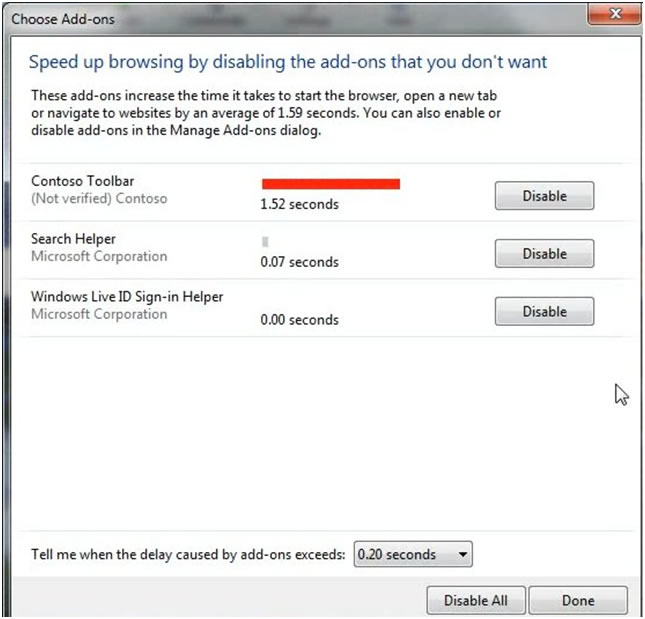
- Add-on Performance Advisor helps you to check any add-on that is causing the browser to slow or performed bad. This lets you decide whether to remove or disable the add-on and fix the performance issue.
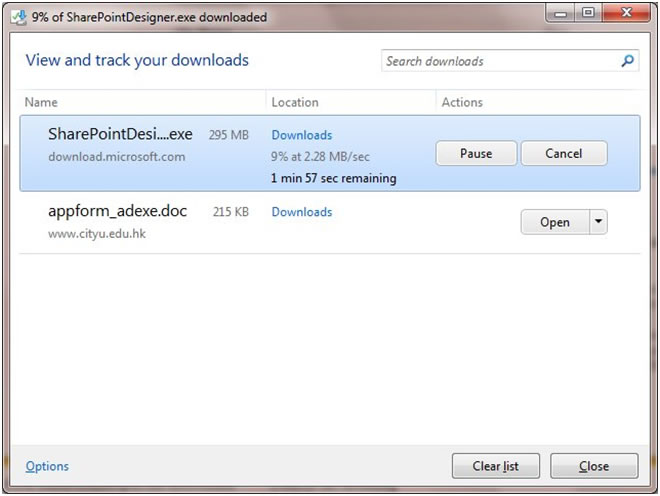
- Download Manager provides a handy central location for viewing and tracking your downloads. It lets you pause/restart downloads, open files, and take other actions easily.
- Tab Isolation and Recovery is a feature of IE9 that makes each tab function separately. If a site crashes on one tab, the rest of your browsing session will not be interrupted. IE9 also includes new support for unresponsive websites so that you will be prompted if the website you are trying to access is not responding or is timed out for some reason.
- Tracking Protection helps prevent websites from gathering information about which pages you visit on the Internet. It blocks the information gathering from websites that appear on Tracking Protection Lists.
As per the announcement on 13 April 2011, in order to allow offices, support units and application developers to have more time to prepare for IE9 support, the Computing Services Centre (CSC) has adopted a temporary policy to prevent IE9 from being downloaded automatically to computers which had joined the University’s CityUMD domain (including Staff LAN and Student LAN PCs). However, you can still visit Microsoft’s downloading website to obtain IE9 directly, test your systems and in-house developed applications with it and let the CSC know your progress. The CSC will periodically review the readiness of CityU’s support of IE9 on campus.
Please note that IE9 only supports Windows 7 and Vista. Windows XP users are unable to use IE9. The CSC will provide IE9 on the Student LAN and the LT/Classroom under the Windows 7 environment to support teaching and learning at the start of Semester A, 2011-2012.
References
Internet Explorer 9: Home
http://www.microsoft.com/windows/internet-explorer/default.aspx
Internet Explorer Test Drive
http://ie.microsoft.com/testdrive/
Internet Explorer 9 Guide for Developers
http://msdn.microsoft.com/en-us/ie/ff468705
Internet Explorer 9 Comparison Table
http://windows.microsoft.com/en-US/internet-explorer/products/ie-9/compare-browsers