Nowadays, people use PCs, mobile devices to perform many activities on the internet, such as webmail, online shopping, e-banking, etc. Private information is frequently being transmitted across the internet. If these sensitive data are not transferred securely, they can easily be captured or stolen by hackers without your knowledge.
SSL is the abbreviation for Secure Sockets Layer. SSL is one of the standard security technologies that protect online sensitive information such as username and password, credit card information and personal particulars when they are being sent across the network. With SSL, data is encrypted so that only the target recipient can understand it but not the others. Moreover, SSL certificates provide unique authentication which means you can be sure that you are sending information to the right server, not a fake one. All University central IT systems are SSL-enabled and enforced, e.g. AIMS, e-Portal, e-Mail, Intranet, etc., and likewise are many departmental websites with forms where users may be asked to enter their EIDs/passwords and personal particulars.
How to check the SSL certificate of a website?
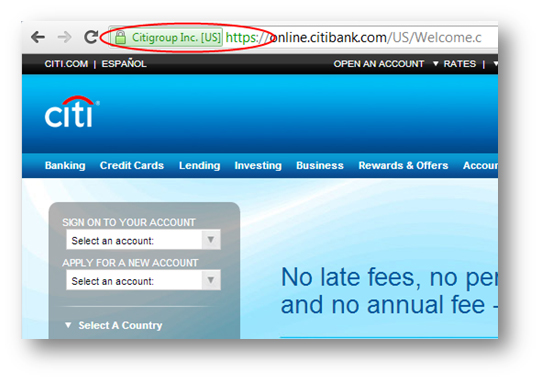
How do you know the website that you are browsing is a SSL-secured website? A SSL-secured website shows a padlock icon on the address bar of the browser. In addition, some websites use “Extended Validation Certificate” which shows a green address bar with the company name. SSL-secured websites often begin with “https://” instead of “http://”.
A SSL-secured website guarantees that the transmitted information between your devices (PC/Mobile phone/Tablet) and the server hosting the website has been encrypted which makes it difficult for hackers to steal the information during transmission. Your next concern may be what if hackers mock up a fake website of the company and steal the customers’ credentials and passwords when they log into the website. Common examples are fake banks or financial agencies[1]. For self-protection, you can click the padlock icon to check the SSL certificate information of the website to ensure it is the intended website that you want to visit.
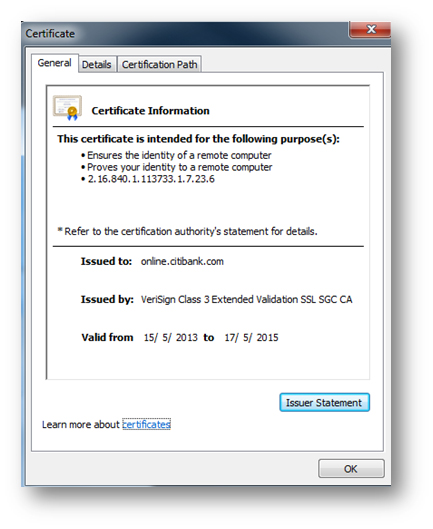
Usually a typical SSL certificate contains the domain name, company name, company address and the expiry date of the certificate as shown below.
In addition to a standard SSL certificate which protects a specific domain website (e.g. www.abc.com), there is another type of certificate called the “Wildcard SSL certificate”[2] (e.g. *.abc.com) which protects multiple domain names (e.g. www.abc.com, mail.abc.com, department.abc.com, etc.). If a Wildcard SSL certificate is used, you will find that the certificate is issued to “*.abc.com” instead of a specific domain name like “www.abc.com“.
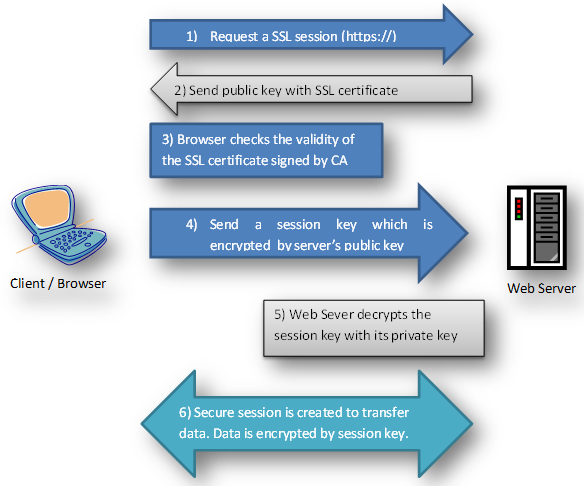
How does SSL work?
How to make your website SSL enabled?
To be a SSL-secured website, the web server which hosts the website must acquire a SSL certificate. All SSL certificates are issued by SSL Certificate Authority (CA)[3]. CAs are trusted third parties that validate various information of the website owner to ensure the SSL certificate is issued to a website of a real company. After verification, the web server creates a public and private key pair. The private key is kept by the web server behind closed doors while the public key is sent to CA through a Certificate Signing Request (CSR). The CA validates the details in the CSR before issuing the SSL certificate. When the SSL certificate is issued, you can store it in the web server together with the private key to secure your website.
Where to purchase a SSL certificate for your website?
At CityU, departments can either purchase SSL certificates by themselves or through the Computing Services Centre (CSC) if they wish to make their websites SSL-secured. As the CSC has already gone through the CA validation and purchased some standard SSL certificates on behalf of the University, departments can simply submit a CSC Work Request for the SSL certificates without going through the long verification process by a CA. Departments just need to handle the payment after the installation. Further details can be found on following web page: