Lync: How to Make Use of Unified Communication
What is Lync Online?
As the University has adopted Microsoft Office 365 (O365) not long ago, one of its module, Lync Online Service (Lync for short) is also offered in the software suite. Lync is a unified communication cloud service hosted by the Microsoft which supports various interactive communication means between two or even among many different parties at the same time. Access to the service is made available on all the major computer platforms and devices (Windows desktop, iOS devices, Android devices and also Windows phones).
Like Skype, Google Talk or Facebook Messenger, Lync is an instant messenger app. You can send text messages, voice calls, video calls or even video conference calls among different parties. Lync 2013 uses the standard video codecs like H.264 and therefore the picture quality of the video can be up to 1080p.
There are many similar apps out there, what makes Lync special?
Instead of the traditional text messages, voice and video calls, you can send files, share your presentation slides and even pass the control of your PC’s desktop to any of the participants. Presentation and communication with foreign parties has never been easier.
It sounds nice, what else?
In additional to its powerful features, it is fully integrated with the O365. For example, if you are using Outlook, you can always check a contact’s Lync “presence” (i.e. whether the person is online) for availability before starting the communication with him/her directly using Lync. Also you can schedule a Lync meeting by Outlook Calendar, so that you will be reminded for the Lync meeting by the calendar function.
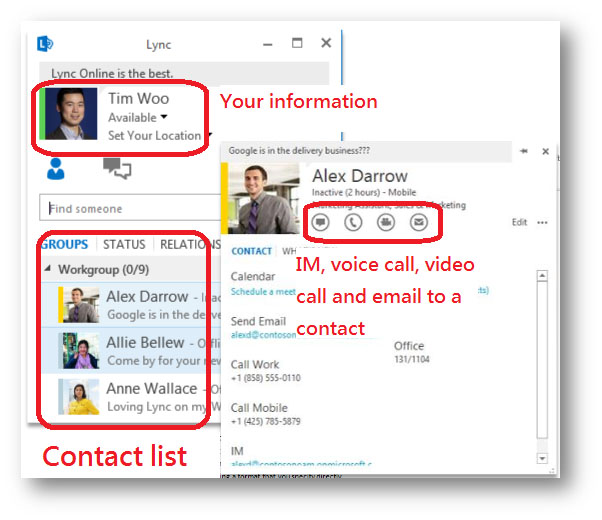
Figure 1 - Example of Lync desktop client
What are the benefits of Lync to the University?
With Lync, teaching and learning is borderless. Lectures can be conducted online for students around the world. Study groups can collaborate a concept or work on a document whenever and wherever there is an internet connection available. In addition, Lync saves travelling cost, or helps reduce the cost for expensive tariff charges of long distance voice and video calls plus the need to set up expansive video conferencing equipment. Lync also relieves the pressure on IT departments in supporting more staff and students in the University with minimal manpower.
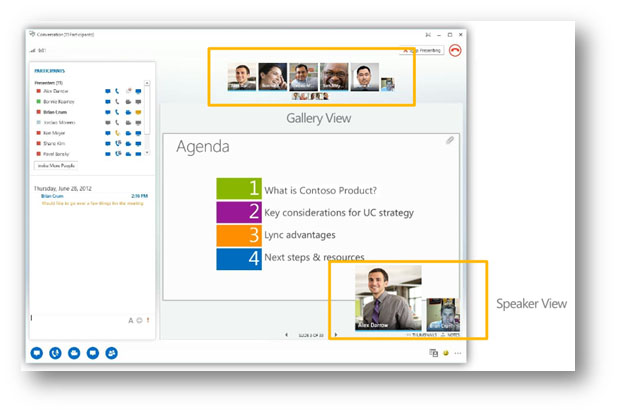
Figure 2 - Video Conference and presentation in action
How can I get Lync then?
For departmental PCs with Office 2013 installed, the client program Lync 2013 for accessing the Lync can be found under the Microsoft Office 2013 application group. If you don’t have Office 2013 installed, please check out “Software for Windows 7 / 8” on Work Desk menu from the staff LAN or student LAN.
If you prefer to use web to access Lync, please sign in to Office 365, go to Settings > Office 365 Settings. Choose Software > Lync to install it.
Can I use Lync on the road?
Sure, there are Lync 2013 apps for most of the mobile platforms. There should be one for you!
Microsoft Lync 2013 for iPhone
- Lync_for_iPhone– Download the app
- FAQ
- Online Help
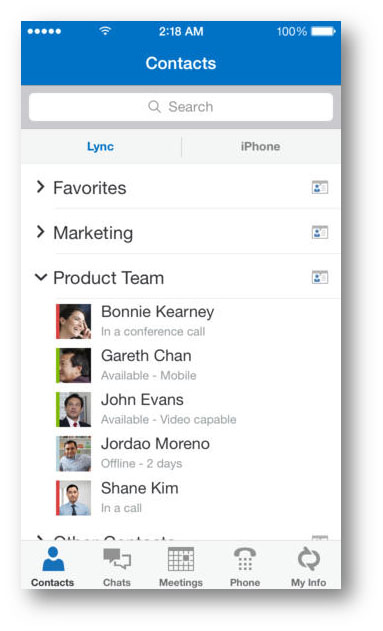
Figure 3 - Lync 2013 for iPhone
<https://itunes.apple.com/us/app/lync-2013-for-iphone/id605841731>
Microsoft Lync 2013 for iPad
- Lync_for_iPad– Download the app
- FAQ
- Online Help
Microsoft Lync 2013 for Android
- Lync_for_Android– Download the app
- FAQ
- Online Help
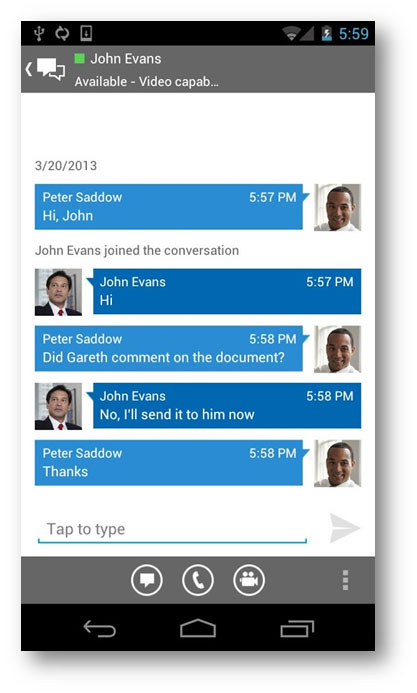
Figure 4 - Lync 2013 for Android
Microsoft Lync 2013 for Windows Phone
- Lync_for_Windows_Mobile– Download the app
- FAQ
- Online Help
Reference: