Remote Examination Invigilation Using AI
In February 2020, teachers and students had to adopt the change of conducting and attending classes online due to the COVID-19 pandemic. With the leadership of the Office of the Provost, the Office of Chief Information Officer, the Computing Services Centre, the Enterprise Solution Office, Office of Education Development and Gateway Education (EDGE), and various academic units collaborated to enable synchronous remote learning. Over 1,200 teachers had received training and support before the commencement of the CityU-Learning1 , an online platform to maintain teaching and learning, to ensure satisfactory learning experience for students. While teaching and learning were carried out smoothly, there were concerns about conducting examinations online. The selection of appropriate assessment methods not only helps evaluate the fulfillment of learning objectives, but they also aid the credentials of the completion of a university degree. However, there are possible malpractice and cheating at different stages of an online examination process without invigilation. Studies show that a non-proctored environment usually yields higher scores than the proctored one2. Hence, an online proctoring solution is required to align well with remote learning pedagogies to ensure the integrity of online assessments.
Respondus LockDown Browser (LDB) is a custom browser that locks down a student's testing environment within the Canvas learning management system. Canvas quizzes created for use with LockDown Browser cannot be accessed using standard browsers such as Chrome or Safari. When students are attempting a Canvas quiz, they are unable to copy, print, visit other websites or access other applications to ensure a fair testing environment.
The LDB also has an additional feature, Respondus Monitor, which allows a fully automated proctoring solution utilizing the students' webcams to record and analyze their Canvas quiz sessions using AI technology. Once the quiz is complete, the course instructor can review each student's activity through a report and the recorded video.
Before the student begins the Canvas quiz, they need to go through the Respondus Monitor startup sequence. Webcam check, photo taking of student's face and ID card are involved (Fig. 1 & 2) to identify the person. Next, the student is required to record a short video to show their exam environment, as shown in Fig. 3, which the teacher may review later. Fig. 4 and 5 illustrate that facial detection must be successful before the online exam can begin.
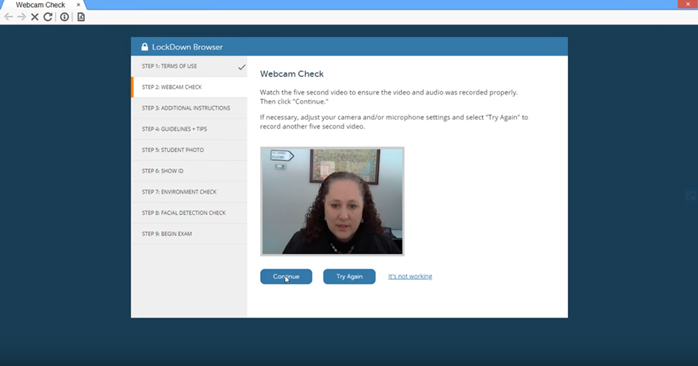
Fig 1. Webcam check
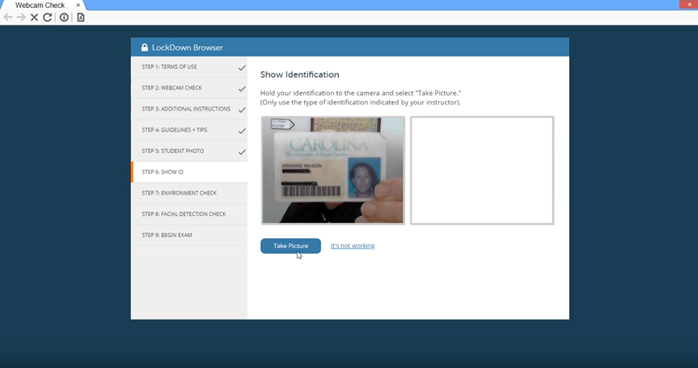
Fig 2. Show identification
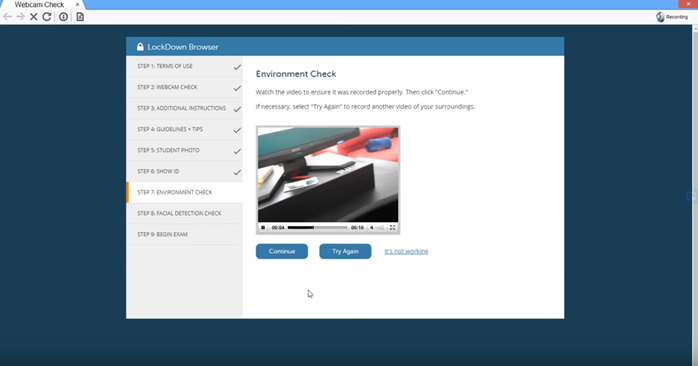
Fig 3. Environment check
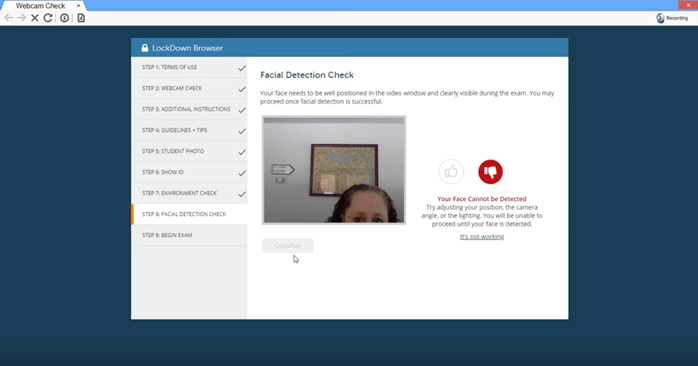
Fig 4. Failing facial detection check
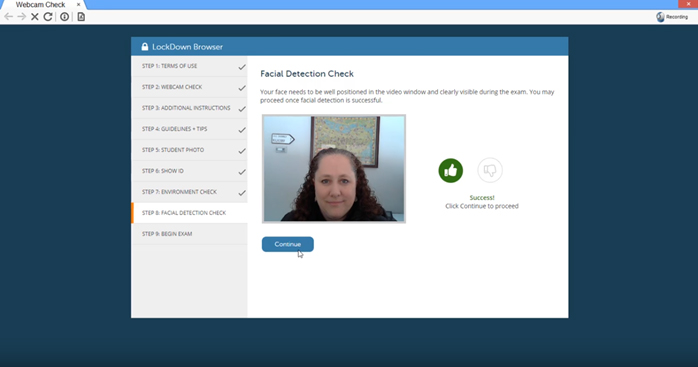
Fig 5. Passing facial detection check
During Semester B 2019/20 and Summer Term 2020, CityU had run a total of 16,240 Respondus Monitor sessions in 62 courses from 15 academic units for their mid-terms and final exams. The majority of users were from the Department of Biomedical Science, the Department of Economics and Finance, and the School of Law. Starting Semester A 2020/2021, online exams are advised to follow a 2-device approach to examination monitoring3, which can be Respondus Monitor on a computer plus Zoom on a smartphone.
Even though Respondus LDB and Respondus Monitor offer a viable option for online proctored exams, teachers can also consider other alternative assessment methods, like self/peer-assessment4 , ePortfolio5 , concept maps6 , or replacing tests with assignments. Such practices will minimize concerns about exam invigilation. In addition, they generally help foster students' critical thinking skills and are easily aligned with the intended learning outcomes7 .
For more information on the setup to enable Respondus LockDown Browser and Respondus Monitor for your Canvas quizzes, please check out our user guide at http://www.jvrhmfr.xyz/elearn/elearn_ins_canvas-respondus-lockdown.html. Interested parties are welcome to contact the e-Learning team at elearn@cityu.edu.hk or 3442-6727 for more information and technical support regarding online exams.
References
1 http://www.jvrhmfr.xyz/standing-against-the-pandemic/cityu-learning
2 http://sbafaculty.oakland.edu/Directory/dadashza/intellcont/Dadashzadeh_The_Online_Examination_Dilemma_203240-1.pdf
3 http://www.jvrhmfr.xyz/arro/whatsnew_content.asp?id=681
4 http://www.jvrhmfr.xyz/edge/workshop/step0708/files/STEP06.pdf
5 http://www.jvrhmfr.xyz/edge/workshop/step0708/files/STEP08.pdf
6 https://www.researchgate.net/profile/Nor_Ibrahim11/publication/319237922_Enhancing_students'_HOTS_in_Laboratory_Educational_Activity_by_using_Concept_Map_as_an_Alternative_Assessment_Tool/links/5d22f96f92851cf4406f4e24/Enhancing-students-HOTS-in-Laboratory-Educational-Activity-by-using-Concept-Map-as-an-Alternative-Assessment-Tool.pdf
7https://ctl.byu.edu/using-alternative-assessments