The Computing Services Centre (CSC) has successfully completed the first phase of the client virtualization project and, after the past Easter break, released around 130 virtualized workstations in one Teaching Studio (AC2-4200) and two Open Access Areas (AC2-G601 and AC2-5802) in the CSC Teaching Studio Areas. The virtualization technology adopted in this phase was “streamed Virtual Hard Disk (VHD)”. The workstations in the said areas are now configured to boot from the virtual hard disk image hosted on servers residing in the Data Centre instead of the physical hard disks installed on the desktop computers. For more information about the concept and benefits of virtualization, please refer to our article on “Client Virtualization in the CSC Teaching Studios” (Network Computing Issue 79 - March 2014).
Experience gained
Although desktop virtualization products have been in the market for some years, an implementation is by no means straightforward. Valuable experiences have been gained from the pilot phase.
We expect to achieve two goals in this phase. Firstly, we would like more students to experience the technology in their everyday learning activities through which more technical and implementation hitches would surface. Secondly, we would like to collect feedback on how the technology could be best deployed in a teaching and learning environment. With these goals in mind, we have selected the two Open Access Areas to give students plenty of time and freedom to mingle with the technology, and a small Teaching Studio to observe the technology being used in a classroom setting.
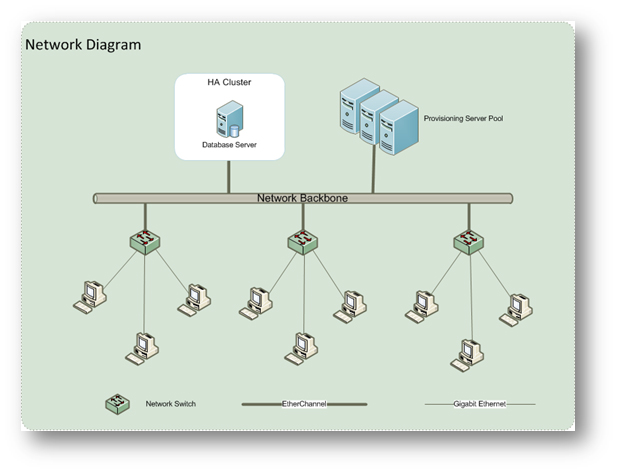
The Teaching Studio was heavily scheduled for classes hence reliability was one of our major challenges. We have built and maintained a reliable system with several identical servers with automatic online failover feature to form a central server pool whereby the workload of any failed server will be picked up automatically by other servers without causing any service interruption to users. In addition, PXE (Preboot eXecution Environment) was used as the booting method so that any of the servers in the pool could respond to the boot up requests of the virtualized workstations. In short, the service could still be provided even if only one server was alive in the pool. Moreover, the database of the system was hosted on a High Availability (HA) cluster that could continue to provide service should some system components fail.
Besides reliability, performance of the system was another challenge. Last summer, we upgraded the local hard disks of all desktop computers in the Teaching Studio Areas to Solid-state drive (SSD) for supporting this I/O intensive service. By using the SSD to hold the virtualized system image, better performance of the desktop computers was guaranteed after virtualization. Based on our experiences, we have expected the performance of the virtualized desktop computers to be affected by the network performance between the server pool and the desktop computers. To boost the performance of the network, we upgraded the network backbones of the CSC Student LAN to optical fibers, grouped the downlinks of network switches in Teaching Studios to form EtherChannels for providing fault-tolerance and high-speed connections to network backbones, and provided gigabit Ethernet to each desktop computer in the Teaching Studio Areas. A group of high performance servers that share the workload automatically (auto load-balancing) was used for providing the service. We have also enabled a feature called Cache-on-disk in our system to cache the streamed content to the local hard disks of the desktop computers instead of repeatedly getting the same content remotely from the servers and thus the performance was boosted.
With the above enhancements, the performance of the virtualized desktop computers is now comparable to that of the conventional desktop computers in other parts of the CSC Teaching Studio Areas.
A New Look
User experience was also our concern and we hoped that users would be familiarized with the new interface quickly and use it without difficulty.
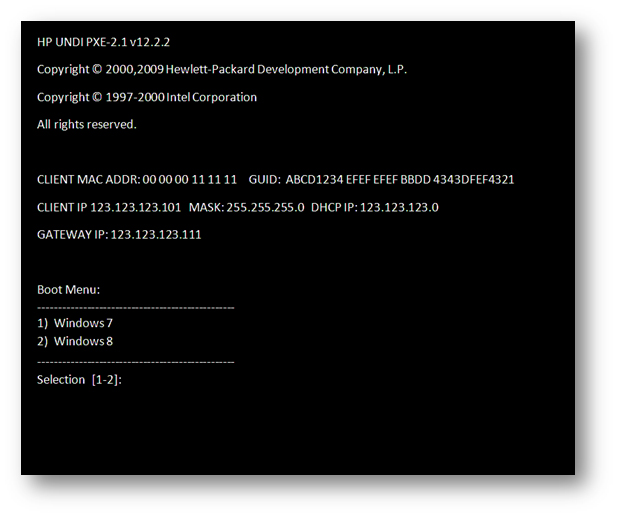
When a virtualized PC is booted up, the following selection menu will be shown:
The new user interface is very similar to the traditional one with MS Windows 7 and MS Windows 8 for user selection. Users can simply select the required operating system to work with. After making the choice, the rest of the boot up process is automatic and soon the selected MS Windows version will be shown.
What is next?
Future implementation of virtual desktop in CSC Teaching Studios and other venues on campus will depend on the results of the pilot phase. Staff and students are encouraged to explore the technology in AC2-4200 and the two Open Access Areas (AC2-G601 and AC2-5802) and to email their comments to the CSC at csc@cityu.edu.hk with the subject “Virtual desktop in CSC”.
References